#
Frequently Asked Questions (FAQ)
Welcome to the FAQ page for the Moon Music Bot!
Here you’ll find answers to some of the most common questions.
If you need more help, visit the Support Server.
#
1. Why isn’t the bot responding?
- Make sure the bot has the necessary permissions in both text and voice channels.
- Check if the bot is online in your server.
- Confirm there are no Discord-wide outages.
- Use the correct prefix (default:
+). - If the issue continues, please reach out to us on the Support Server.
#
2. How can I report bugs or suggest features?
- Join our Support Server and share your issue in the bug report channel.
- Suggest new features in the suggestions channel.
#
3. What does <prefix> mean in this documentation?
<prefix>refers to the bot’s prefix for your server.
The default prefix is:+.
#
4. How can I find or change the bot’s prefix?
Mention the bot in chat to see its current prefix.
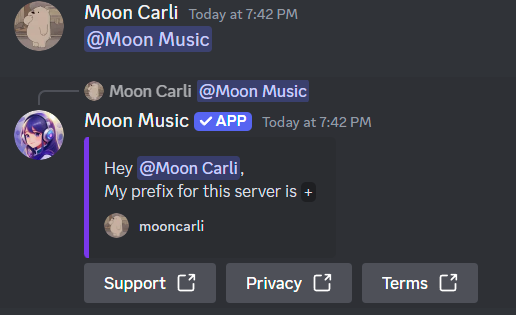
If you have Administrator permissions, you can change the prefix using
/prefixcommand.
#
5. How do I play music?
- Join a voice channel.
- Use:
/play <song name or URL>. - The bot will join your channel and start playing music.
#
6. How do I control music playback?
- Pause:
/pause - Resume:
/resume - Skip:
/skip - Stop:
/stop - Queue list:
/queue
#
7. How can I purchase premium?
- Visit our Patreon page to get premium access.
#
8. Why does the bot require Administrator permissions?
- Administrator permissions are not strictly required, but recommended to avoid permission errors.
- Without proper permissions, the bot may not be able to join channels, send messages, or manage playback.
#
9. Can the bot play from Spotify, SoundCloud, or other platforms?
- Yes! The bot supports all major music platforms.
#
10. Can I limit the bot from responding in certain channels?
- Yes! Server admins can restrict bot commands in specific channels.
- Use:
/ignore add <channel name>to add a channel to the ignore list.
#
Need more help?
If you have other questions or need further assistance, join the Support Server.
We’re here to help!